Tuesday, July 8, 2014

Could not find stored procedure 'proc_ECM_RetrieveTableNames' Error

Got this error while creating Managed Metadata Service Application

Cause : Error occurs when we create  managed metadata service with a  pre-existing database (even a blank database) in SQL.
Solution : We need to recreate the managed metadata service application with a new database name.


SpadeWrox SharePoint Interview Questions/SharePoint Interview Questions

I went for this interview which was for the Post of SharePoint Developer.
I have 3 years experience,so difficulty of questions was based on my experience.
I went totally unprepared and I messed it up.To some extend it was easy if I would have prepared a bit.
Would try to answer this questions and update this post whenever possible,till then you guys can enjoy the questions and Best of Luck! for your next interview :) 


1)      Introduce yourself
2)      What happens when we run code with RunWithElevatedPrevileges ? What happens in SharePoint internally
3)      What is CAML
I answered it is a query language,I was then asked
4)      what is the other way of quering SharePoint (Answer : LINQ)
5)      SharePoint Heriarchy
6)      Difference between SPSite and SPWeb Object
7)      5 out of the box WebParts
8)      How many DB’s does SharePoint have(Answer: configDb,and other DB’s used for different services like Managed Metadata service,Search service)
9)      When we create a new Web Application,the DB that gets created is it a content DB
10)   What are types of DB in SharePoint
11)   What is User Profile Service
12)   What is an App in SharePoint 2013
13)   What is the user process used by SharePoint 2013 App
14)   Can you write a CAML without u2u
15)   Can you create a list workflow in 30 minutes
16)   Does SharePoint Desginer support only Sequential workflow?
17)   When we create a Web Application,the page promts for DB name,then how do different site collection DB’s are created in same Web Application?
18)   How is the partion of different site collection done ?
19)   What is the main method in Timer jobs?
20)   Have you created any timer jobs ?
21)   Have you created any workflows ?
22)   What are the different workflows?
23)   What is REST
24)   What can you do with REST
25)   What are the OOB features/web parts you have used ?
26)   What are the different authentication types
27)   Can we have Dual Authentication that is Claims & Classic Authentication
28)   What is Event Receiver
29)   What are types of Event Receivers

Thursday, July 3, 2014

Lists in SharePoint or SharePoint List Free Tutorial

 
Lists have items, columns, and views. Items and columns correspond to the rows and
columns that you see on a grid layout in a spreadsheet. Views present list data in a friendlier
format that acts very similarly to a report.
 
Sample list which shows items,columns,view


The view here is All Items which is the default view,which also means that it shows all columns and items,hence called All Items.
You can also have a custom view,in which you decide the columns you want to see in the view.
 
SharePoint List Coloumn types:
1)      Single line of text
2)      Multiple lines of text
3)      Choice – You can give choice Example : Citynames as Pune,Mumbai,New York
4)      Number
5)      Currency
6)      Date and Time
7)      Lookup –  You can have a list as reference which you can use as look up like if you have a lookup column which has city names
8)      Yes/No - This checkbox column indicates whether an item matches a specific criterion.
9)      Person or Group - Users can select people or groups which they want to associate with the list
10)   Hyperlink or Picture - You can use this column type to allow users to enter a web address into a list item to create a hyperlink or display an image located at the source location.
11)   Calculated – Rather than have users enter information manually, you may want to calculate values based on other columns within the list
12)   Task Outcome (New in SharePoint 2013) - You can use this column type when defi ning workfl ow solutions. It is very similar to the Choice column in its properties, but is often leveraged related to the tracking on tasks for workflow
13)   External Data - In some cases, you may want to associate business data from an external business application with your list items. For example, you may have a listing of all products in a sales database and instead of re-creating it in SharePoint, you can connect to it and reuse that information.
14)   Managed Metadata: In some cases within your organization, another administrative user may have already defined a set of metadata to describe important aspects of your organization. Therefore, there is no requirement for you to redefine this information yourself.Example : Departments in a organisation are Finance,Admin,IT operations. So when you start typing this pre-defined and existing words populate.
15)   Audiences( New in SharePoint 2013 ) - If a list has audience targeting enabled, this column type is added to it automatically. Audiences are groups of users that you defi ne based on a set of criteria. When
you use audiences on list items, the items appear only to members of the audiences associated with the item.

Tuesday, July 1, 2014

Add or Remove solution using Powershell in SharePoint 2010

From the Start menu, select All Programs > Microsoft SharePoint 2010 Products > SharePoint 2010 Management Shell

Deploy solutions using powershell

Add-SPSolution -LiteralPath C:\Users\jinivthakkar\Desktop\MySolution.wsp

Install-SPSolution -Identity HitCounter.wsp -WebApplication http://myserver03:8888 -GACDeployment –CASPolicies

Get-SPSolution MySolution.wsp


Removing solution

Retract Solution from SharePoint Farm

Uninstall-SPSolution -Identity MySolution.wsp -WebApplication http://myserver03:8888

Remove solution from SharePoint Farm

Remove-SPSolution -Identity MySolution.wsp


Friday, June 27, 2014

Adding attachment to list programmatically in SharePoint 2010 OR Adding list item to SharePoint 2010

using System;
using System.Collections.Generic;
using System.Linq;
using System.Text;
using System.IO;
using Microsoft.SharePoint;

namespace ListFileUpload
{
    class Program
    {
        static void Main(string[] args)
        {
            FileUploadToList();
        }


        public static void FileUploadToList()
        {
            //file location which needs to be uploaded
            FileStream stream = File.OpenRead(@"C:\Users\jinivthakkar\Desktop\UploadToListAsAttachment.docx");
            string path = @" C:\Users\jinivthakkar\Desktop\UploadToListAsAttachment.docx ";

            //extract file name
            string fileName = Path.GetFileName(path);

            //extract extension
            string extension = System.IO.Path.GetExtension(path);

            //extract Title
            string docTitle = fileName.Substring(0, fileName.Length - extension.Length);


            //Read file and copy information in byte array
            byte[] fileBytes = new byte[stream.Length];
            stream.Read(fileBytes, 0, fileBytes.Length);

            //Site url where document which needs to be uploaded
            using (SPSite oSPsite1 = new SPSite("http://myserver01:8585/sites/Test"))
            {

                using (SPWeb oSPWeb = oSPsite1.OpenWeb())
                {
                    oSPWeb.AllowUnsafeUpdates = true;
                    //List where file needs to be uploaded
                    SPList myList = oSPWeb.Lists["MyList"];

                    SPListItem item = myList.Items.Add();
                    item["Title"] = docTitle;
                    item.Update();
                    SPAttachmentCollection attachments = item.Attachments;
                    int docID = item.ID;
                    attachments.Add(fileName, fileBytes);

                     //Item update,list update
                    item.Update();
                    myList.Update();
                    stream.Close();

                }
            }
        }

    }
}


This code reads a file on local machine and adds list item as attachment to list in SharePoint 2010

Saturday, June 21, 2014

Microsoft SharePoint Server 2010 encountered an error during setup / Exception: System.Data.SqlClient.SqlException: Could not find stored procedure 'sp_dboption'


Try installing sp1(service pack 1) for Sharepoint 2010 and then try to install SharePoint 2010
or Run SharePoint Configuration Wizard

It may sound weird to install Service pack before you install SharePoint but it worked for me twice J

TADA 

SQL server 2012 Feature Upgrade failed


I had my SQL 2008 R2 Enterprise Edition and I was trying to upgrade it to SQL 2012 Standard version which is not allowed


 ·  Cross-version instances of SQL Server 2012 are not supported. Version numbers of the Database Engine, Analysis Services, and Reporting Services components must be the same in an instance of SQL Server 2012.
·          
·         ·  Cross-platform upgrade is not supported. You cannot upgrade a 32-bit instance of SQL Server to native 64-bit using SQL Server Setup. However, you can back up or detach databases from a 32-bit instance of SQL Server, and then restore or attach them to a new instance of SQL Server (64-bit) if the databases are not published in replication. You must re-create any logins and other user objects in master, msdb, and model system databases.

·        ·   You cannot add new features during the upgrade of your existing instance of SQL Server. After you upgrade an instance of SQL Server to SQL Server 2012, you can add features by using the SQL Server 2012 Setup. For more information, see Add Features to an Instance of SQL Server 2012 (Setup).

·     ·    Failover Clusters are not supported in the WOW mode. If you currently have SQL Server 2005, or SQL Server 2008, or SQL Server 2008 R2 failover clusters on the 32-bit subsystem (WOW64), upgrade of the failover cluster to SQL Server 2012 is not supported

·     ·  Upgrade from SQL Server 2005 Evaluation, SQL Server 2008 Evaluation, and SQL Server 2008 R2 Evaluation to SQL Server 2012 is not supported.

Thursday, May 29, 2014

SharePoint 2010 Tutorial Free - What is Central Administration

There is a lot of shit available on the internet but to tell in simple words

Upon installing SharePoint 2010,SharePoint provides a GUI for the user from which the user can control everything about SharePoint.

How can you access this GUI ?

Go to Start menu->Search Central Admin->Right Click->Run as Admin


It will open up this window in Internet Explorer.


      For more information free tutorial for beginners on SharePoint. Please refer other posts on my blog.

Reference : http://msdn.microsoft.com/en-us/library/ms253179(v=vs.100).aspx


The program or feature cannot start or run error


I go this error while running PreInstaller.exe while I was trying to Install SharePoint 2013

Resolution
Install .Net 4.5 manually and run the PreInstaller.exe
Tada ! Its Done
Trust me I have Googled enough but could not find a single post that could provide any resolution to this error

Unsupported 16-Bit application Error + SharePoint 2013 Installation


I go this error while running PreInstaller.exe while I was trying to Install SharePoint 2013

Resolution
Install .Net 4.5 manually and run the PreInstaller.exe
Tada ! Its Done
Trust me I have Googled enough but could not find a single post that could provide any resolution to this error

OK I am sure a lot of resolution come up on Google but none mention that the Task Scheduler Service must be running.
In my case the Task Scheduler service wasn't running.

Wednesday, May 28, 2014

SharePoint 2010 Tutorial Free - SharePoint 2010 Architecture


     It has 4 layers

    1) SharePoint Sever 2010(Enterprise/Standard)
    2) SharePoint Foundation 2010
    3) SQL Server 2008,IIS 7.0 and .Net 3.5 Framework
    4) Windows server  2008(64bit)

Considering that you have just started learning SharePoint,trust me even if you know this you have started very well.Cheers !

So normally when I go for interviews in companies ,I just draw 4 storey building and name each block as mentioned when asked to define the architecture of SharePoint 2010


And as you learn SharePoint,eventually you will come to know what each layer contains.
      

      For more information free tutorial for beginners on SharePoint. Please refer other posts on my       blog. 

SharePoint 2010 Tutorial Free - What is SharePoint ?

Microsoft SharePoint 2010 is a Web-based platform that provides  enterprise-scale capabilities to meet business-critical needs such as managing content and business processes, simplifying how people find and share information across boundaries, and enabling informed decision

SharePoint enables their users to create, manage, and easily build SharePoint sites.

SharePoint helps teams stay connected and productive by providing easy access to the people, documents, and information that can help in decision making and getting work done.


For more information free tutorial for beginners on SharePoint. Please refer other posts on my blog. 

Saturday, May 24, 2014

Creating folder and sub folder programmatically in SharePoint

public static void createFolderSubFolder()
        {
            string libraryName = "Test";
            string folderName = "Folder";
            string siteUrl = "http://myserver03:8989/abc";
            try
            {
                SPSecurity.RunWithElevatedPrivileges(delegate()
              
                    using (SPSite osite = newSPSite("http://myserver03:8989/abc"))
                    {
                        using (SPWeb oweb = osite.OpenWeb())
                        {
                            SPFolderCollection folderCollection = oweb.Folders;
                            string newFolderUrl = siteUrl + "/" + libraryName + "/" + folderName;
 
                            SPFolder newFolder = folderCollection.Add(newFolderUrl);
 
                            Console.WriteLine("Folder created");
 
                            string secondFolderName = "subFolder";
                            string newSubFolderUrl = newFolderUrl + "/" + secondFolderName + "/";
 
                            SPFolder newSubFolder = folderCollection.Add(newSubFolderUrl);
                            Console.WriteLine("SubFolder created");
                            Console.ReadLine();
                        }
                    }
                });
 
            }
 
            catch (Exception ex)
            {
                throw ex;
            }
 
        }


Please note : Please check out my blog on how to create a library,content type,columns,subsite programmatically.


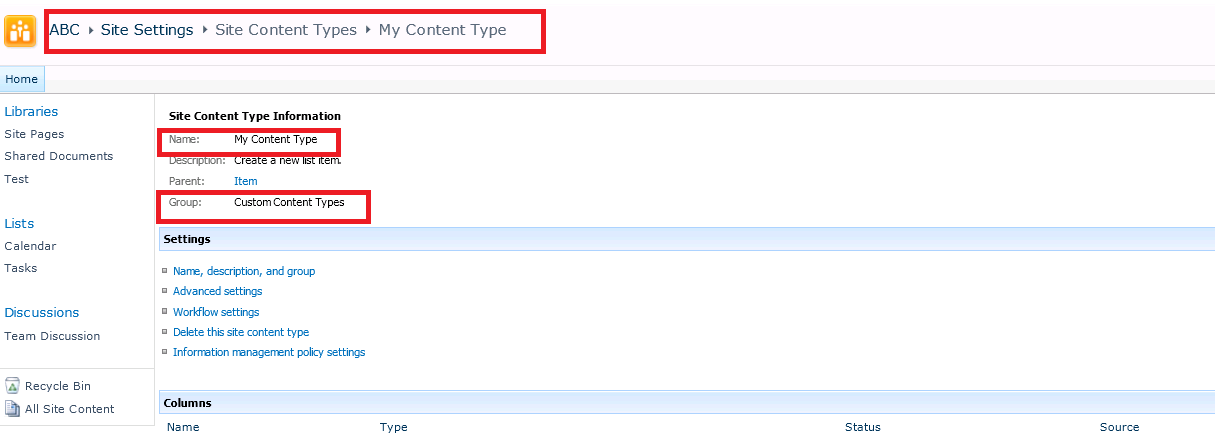
Creating content types programmatically

public static void createContentTypes()
        {
            string contentTypename = "My Content Type";
            try
            {
                SPSecurity.RunWithElevatedPrivileges(delegate()
                {
                    using (SPSite osite = newSPSite("http://myserver03:7676/abc"))
                    {
                        using (SPWeb oweb = osite.OpenWeb())
                        {
                            SPContentType contentType = newSPContentType(oweb.ContentTypes["Document"], oweb.ContentTypes, contentTypename);
                            oweb.ContentTypes.Add(contentType);
                            contentType.Group = "Custom Content Types";
                            contentType.Description = "Custom content type";
                            Console.WriteLine("Content Type Created");
                            Console.ReadLine();
                        }
                    }
                });
            }
            catch (Exception ex)
            {
                throw ex;
            }
 
        }


Note : If you need to add columns to content types programmatically,please check out my blog.I have a post on how to add columns programmatically.